
Hybrid Search and Reranking
What is Hybrid Search?
Hybrid Search is a powerful technique that combines the best of two worlds: Keyword Search and Vector Search.
- Keyword Search (BM25): Excellent at finding exact matches (e.g., specific error codes, product IDs, or unique names). It's like "Command+F" on steroids.
- Vector Search (Semantic): Amazing at understanding context and meaning. It knows that "dog" and "puppy" are related, even if the words don't match exactly.
Why do we need it?
Imagine searching for "Java connection error".
Might return results about "Coffee shop wifi issues" because Java (language) and Java (coffee) are semantically close in some contexts, or might miss specific error codes.
Might miss a useful article titled "Solving JDBC Connectivity Issues" because it doesn't strictly contain the word "error".
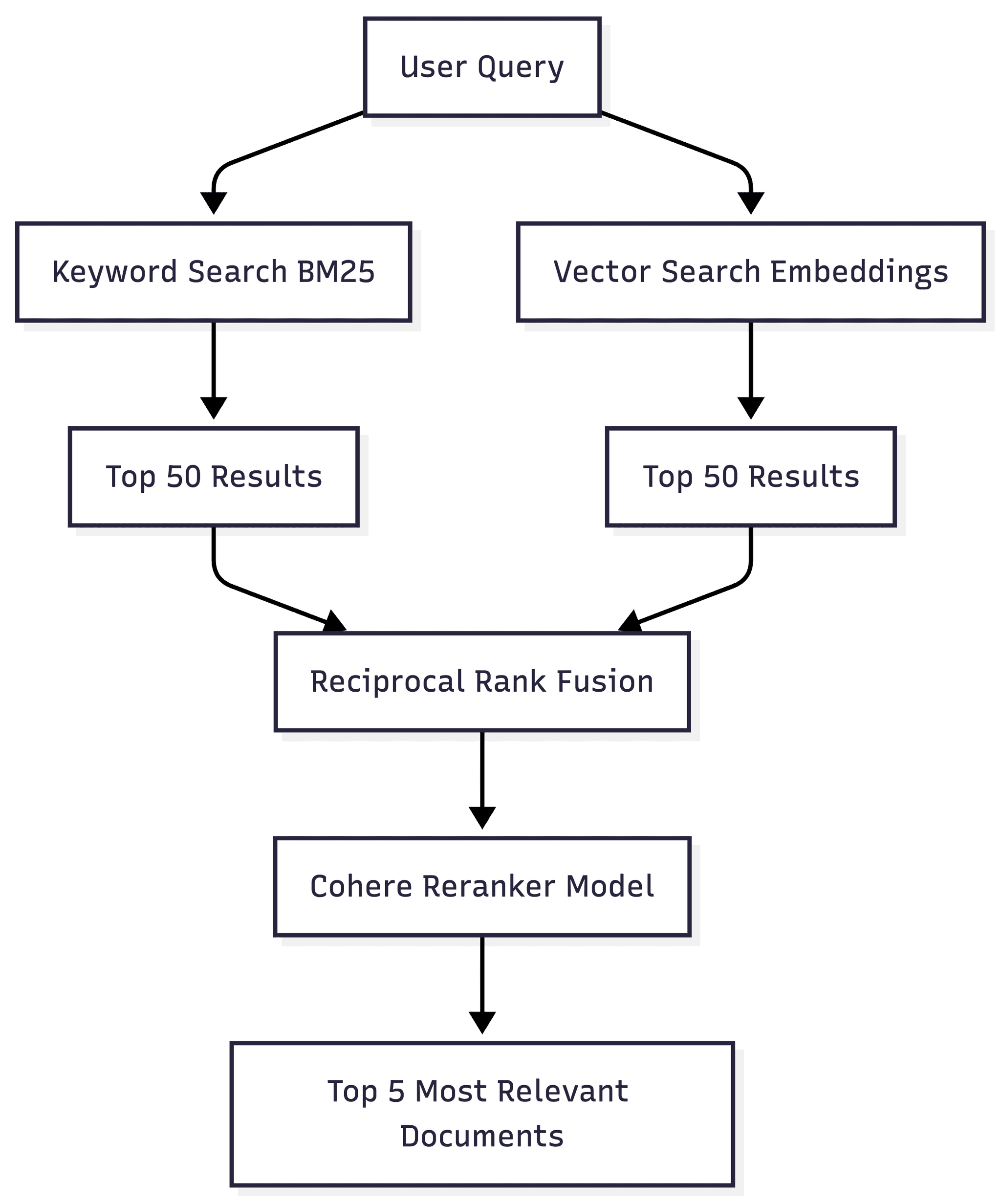
Hybrid Search runs both, merges the results, and gives you the most relevant answers.
The Role of Reranking
Searching is fast, but sorting by true relevance is hard. This is where Reranking comes in.
Think of the Retriever as a fast librarian who creates a pile of 50 potentially relevant books. The Reranker is the expert professor who carefully reads the pile and picks the top 5 distinct best ones.
Creating Hybrid Search Library
import { getOrCreateCollection } from "./chromaClient";
import { miniSearch } from "./lexicalIndex";

const SEMANTIC_WEIGHT = 0.7;
const LEXICAL_WEIGHT = 0.3;

export async function hybridSearch(query: string) {
    // Lexical
    const lexicalResults = miniSearch.search(query, {
        prefix: true,
    });

    // Semantic
    const collection = await getOrCreateCollection("secondbrain");
    const semanticResults = await collection.query({
        queryTexts: [query],
        nResults: 5,
        include: ["documents", "metadatas", "distances", "embeddings"],
    });

    // Normalize
    const semanticDocs =
        semanticResults.documents?.[0]?.map((doc, i) => ({
            content: doc,
            meta: semanticResults?.metadatas?.[0]?.[i],
            score: 1 - (semanticResults?.distances?.[0]?.[i] ?? 0),
            source: "semantic",
        })) ?? [];

    const lexicalDocs = lexicalResults?.map((r) => ({
        content: r.content,
        meta: { filePath: r.filePath },
        score: r.score,
        source: "lexical",
    }));

    // Merge and Rank
    const combined = [...semanticDocs, ...lexicalDocs];

    const ranked = combined.map((d) => ({
        ...d,
        finalScore:
            d.source === "semantic" ? d.score * SEMANTIC_WEIGHT : d.score * LEXICAL_WEIGHT,
    }))
        .sort((a, b) => b.finalScore - a.finalScore)
        .slice(0, 5);

    return ranked;
}
Also create the lexical index for the documents. We will be using MiniSearch for this.
import MiniSearch from "minisearch";

export type LexicalDoc = {
    id: string;
    content: string;
    filePath: string;
};

export const miniSearch = new MiniSearch({
    fields: ["content"],
    storeFields: ["content", "filePath"],
    searchOptions: {
        boost: {
            content: 2
        },
        fuzzy: 0.2,
    }
});

export function addToLexicalIndex(docs: LexicalDoc[]){
    miniSearch.addAll(docs);
};
Update chunk and Ingest function to create lexical index
addToLexicalIndex(
        chunks.map((chunk, i) => ({
            id: `${filePath}-${i}`,
            content: chunk,
            filePath,
        }))
    );
Update Chat API Logic
When making the api call, under the RAG results we will update the logic to make Hybrid Search instead of the traditional Semantic Search. Replace everything after making the chromaDB call with the following:
const ragResults = await hybridSearch(query);
const context = ragResults.map((r, i) =>
      `Source ${i + 1} (${r.meta?.filePath ?? "unknown"}):\n${r.content}`)
.join("\n\n");
Next Steps
In the next section, we’ll:
Delete Sessions
Just like we have an option to delete the sessions and messages under a chat, we will add the same feature on our second brain project.
If you want to know more about this, do checkout our video guide: